
Custom Snippets
Spck Editor's Custom Snippets feature lets you define reusable code templates that show up in the autocomplete list. This page provides ready-to-paste starter packs for the most common patterns across popular frameworks — so you can skip writing the boilerplate yourself.
Availability: Custom Snippets is a premium feature. It's unlocked with a Gold subscription in the full Spck Editor, or as a one-time purchase via Spck Editor Lite.
Each pack is a JSON config keyed by language mode (javascript_ls for the frontend frameworks, python_ls for the Python ones, html_ls/css_ls for template and style fragments). Pick a framework, hit Copy JSON, and paste it into the snippet configuration editor in Spck Editor.
How to Use
- Pick a framework below and click Copy JSON.
- In Spck Editor, open
Settings > Editor > Custom Snippets. - Tap the Code icon (top of the snippet list) to edit the configuration as JSON.
- Paste the copied JSON in, then tap Update to overwrite your snippet configuration.
- The snippets will appear in your editor's autocomplete list as you type their trigger name.
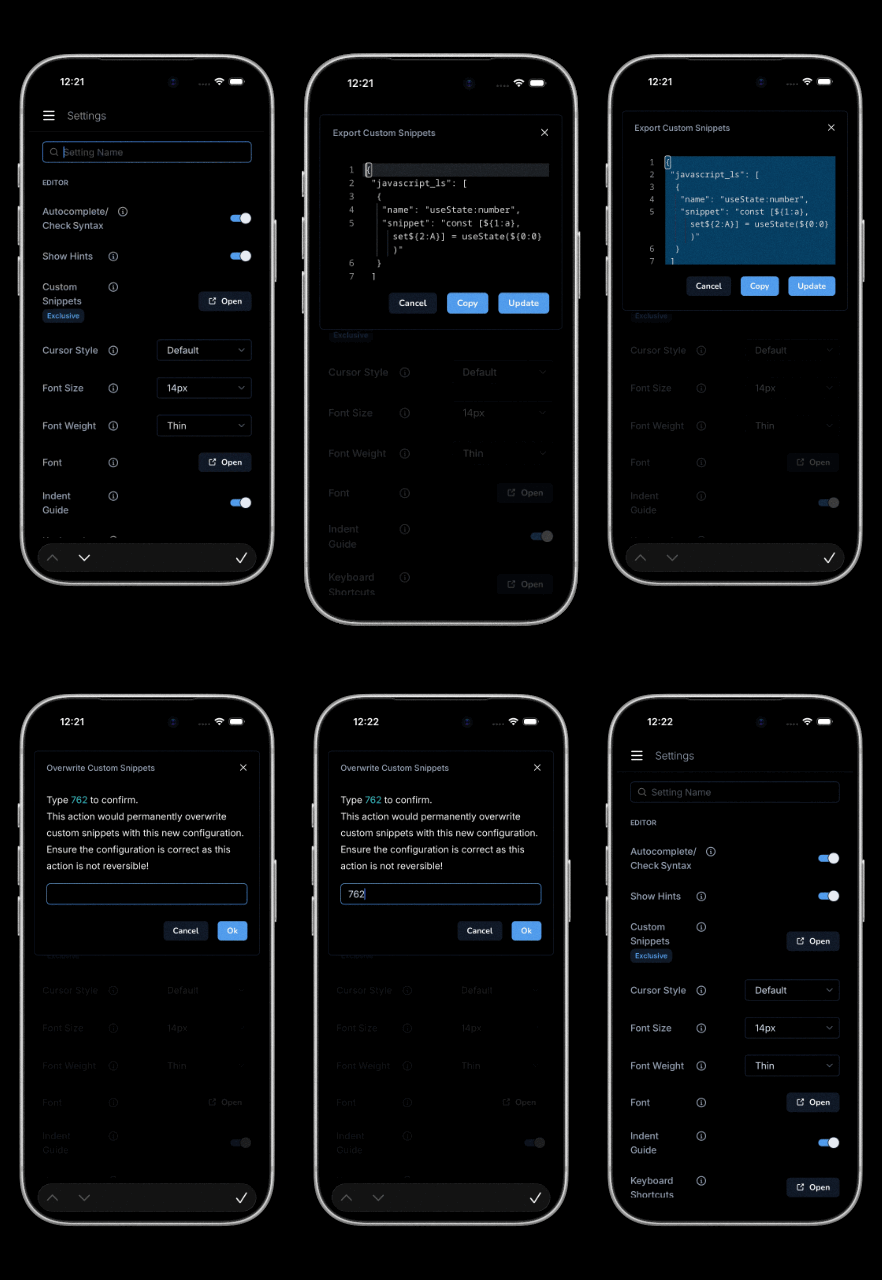
All snippets use tab-stop placeholders ($1, $2, $0) so the cursor jumps between editable positions after insertion. See the Custom Snippets reference for the placeholder syntax.
Snippet Packs
Hooks (useState, useEffect, useRef, useMemo, useCallback, useContext, useReducer), functional and arrow components, custom hooks, forwardRef, and Context Provider patterns.
Target mode: javascript_ls · Download react.json
App Router scaffolding (page, layout, loading, error, not-found), route handlers, server actions, generateMetadata/StaticParams, Link, Image, dynamic import, navigation hooks, and middleware.
Target mode: javascript_ls · Download nextjs.json
Composition API primitives, lifecycle hooks, defineProps/Emits, Pinia store, and Options API fallback (script side) plus SFC scaffolding, v-for/v-if/v-model/v-bind/v-on, slots, transitions, and router-link (template side).
Target modes: javascript_ls + html_ls · Download vue.json
Reactive declarations, lifecycle, all store types, and event dispatcher (script side) plus component scaffold, {#if}/{#each}/{#await}/{#key} blocks, bind:/on:/class:/use: directives, store subscription, and slots (template side).
Target modes: javascript_ls + html_ls · Download svelte.json
Common utility groupings (flex/grid layouts, cards, buttons, inputs, badges, alerts), responsive and dark-mode variants, plus CSS-side @apply/@layer/@tailwind directives.
Target modes: html_ls + css_ls · Download tailwind.json
App scaffold, all HTTP methods, async route with try/catch, middleware, auth middleware, error handler, Router module, CORS, static files, and request param helpers.
Target mode: javascript_ls · Download express.json
App scaffolding, GET/POST/PUT/DELETE routes, async handlers, path and query params, Pydantic models, Depends, HTTPException, APIRouter, BackgroundTasks, CORS middleware, file uploads, and lifespan handlers.
Target mode: python_ls · Download fastapi.json
Models, function and class-based views, DRF APIView/ViewSet/Serializer, forms, urlpatterns, admin registration, migrations, custom managers, signals, and management commands.
Target mode: python_ls · Download django.json
Customizing the Snippets
These packs are starting points — most developers add their own patterns over time. You can edit any snippet directly inside the app:
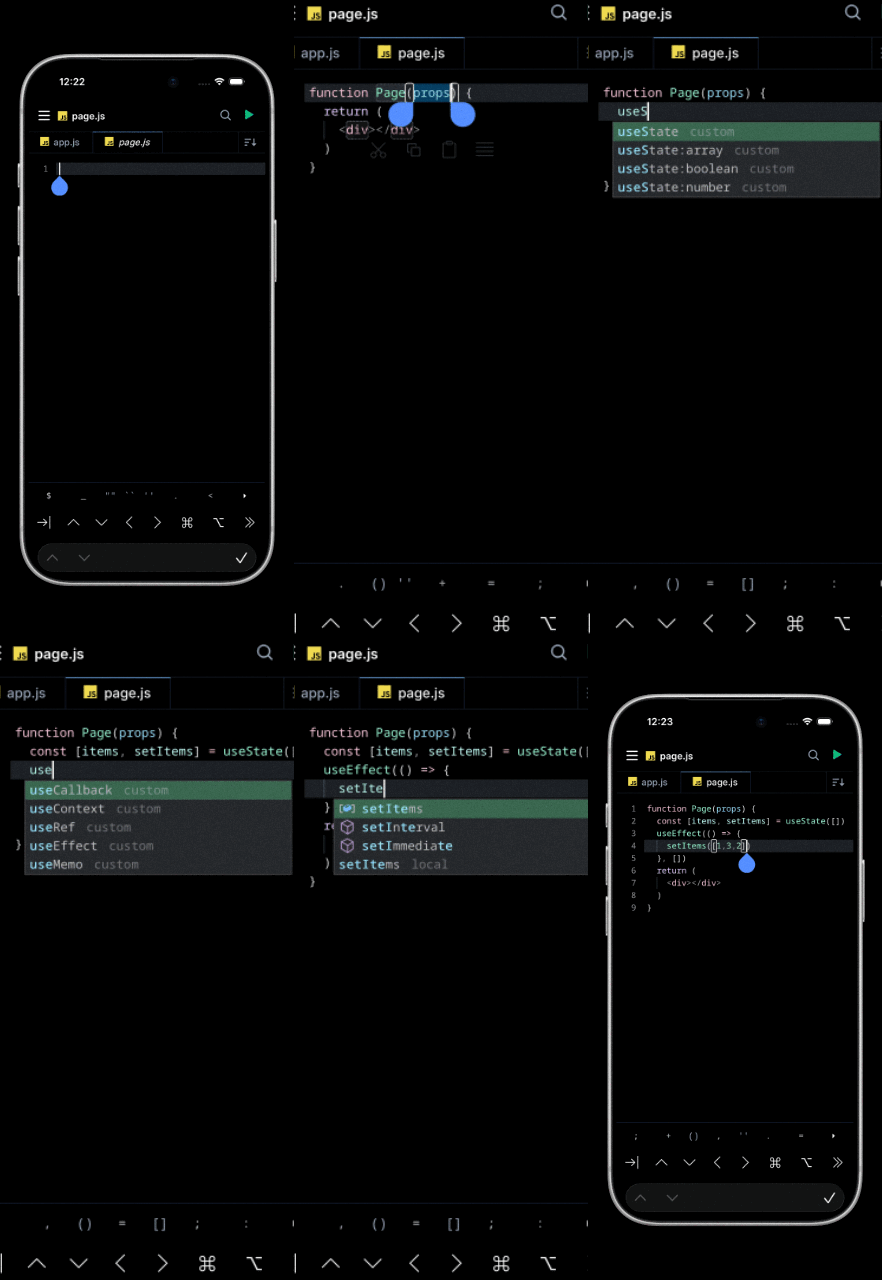
Useful additions to consider:
- Component scaffolds matching your project's file structure (e.g. a
pagesnippet that includes your standard imports and layout wrapper). - Test boilerplate — your testing framework's
describe/itstructure with the imports you always need. - Logging or telemetry calls with your project-specific event names pre-filled.
- API client calls — wrap your standard
fetch/ axios / SDK call pattern with error handling.
The JSON format is straightforward — each snippet is just a name (what shows in autocomplete) and a snippet body. Edit the downloaded JSON in any text editor before pasting it into the snippet configuration.
See Also
- Custom Snippets reference — placeholder syntax, scoping, and how to manage snippets in-app.
- Spck Editor Lite — one-time-purchase version that includes Custom Snippets.
- Pricing — Gold subscription details for the full Spck Editor.
- Getting Started — installation and an overview of Spck Editor features.