
AI Coding Agents (ACP)
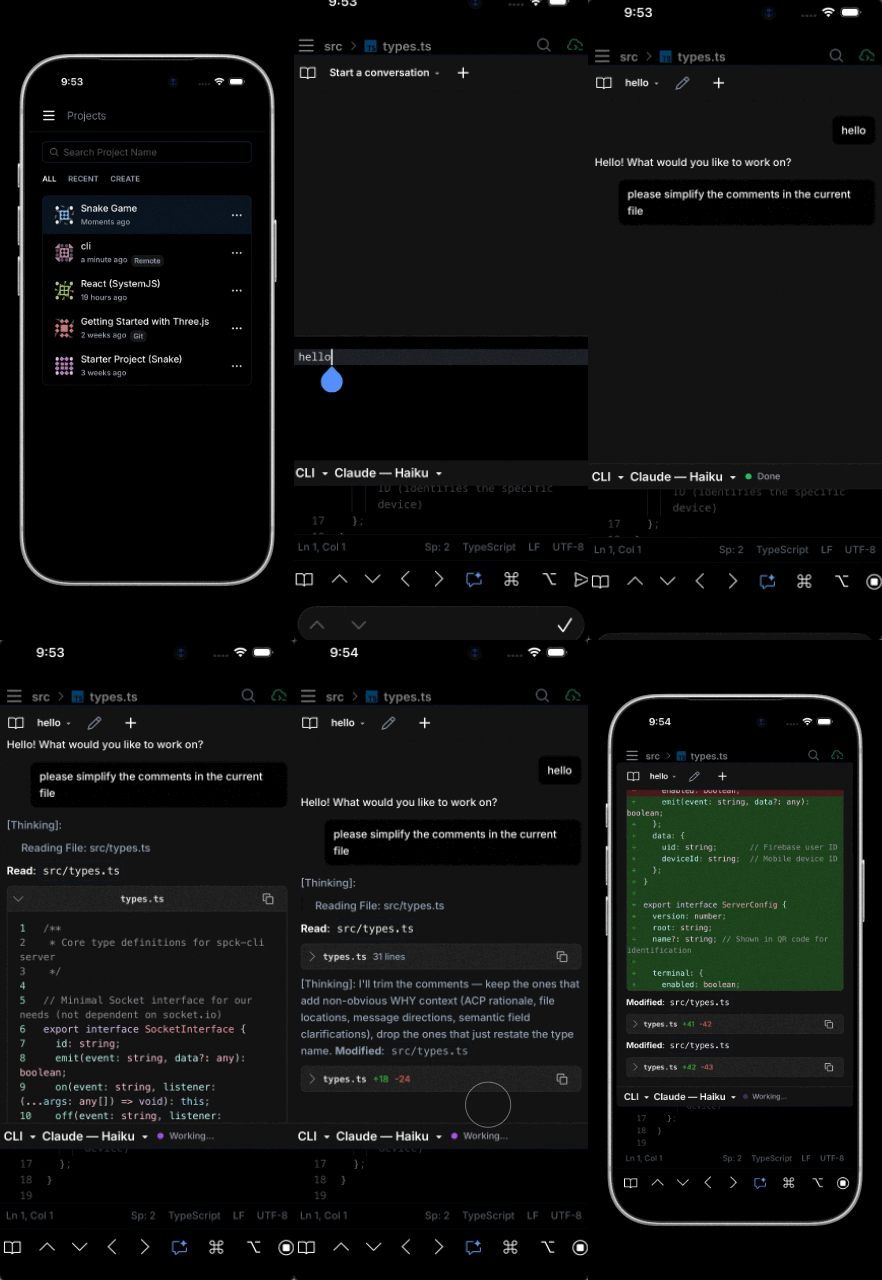
Run Claude Code, OpenAI Codex, or Gemini CLI directly from your phone through Spck Editor's AI Chat. The Spck CLI bridges your editor to locally installed agent CLIs over the open Agent Client Protocol (ACP), so the model runs on your machine, with your subscription, against your real files — while you supervise from a mobile device.
What is ACP and Why Use It?
The Agent Client Protocol (ACP) is an open standard from Zed Industries for editor ↔ AI-agent communication, in the same spirit as the Language Server Protocol (LSP). Spck CLI 0.6.0+ implements ACP and acts as the transport between Spck Editor's AI Chat (the client) and any ACP-capable agent binary you have installed (the agent).
Compared to the in-app server-routed AI Chat, the local-ACP path gives you:
- Your own subscription — agent calls bill against your Claude Code / ChatGPT / Gemini account, not your Spck Editor AI quota.
- Real filesystem access — agents read and write actual files on disk via the CLI, not the editor's in-memory copies.
- Native tools — file watchers, language servers, and shell commands run on your real machine.
- Continuity with desktop — the same
claude/gemini/codexlogin you use at your desk drives the mobile chat.
Supported AI Agents
Install whichever agents you want available. Spck CLI auto-detects them on startup.
| Agent | Install |
|---|---|
| Claude Code | claude |
| OpenAI Codex | npm install -g @agentclientprotocol/codex-acp |
| Gemini CLI | gemini |
Installation and Setup
1. Install the Spck CLI
If you don't already have it:
npm install -g spck
# or run without installing
npx spck
See Getting Started with Spck CLI for the full first-run wizard.
2. Install one or more agent CLIs
Pick whichever agents you want available. You can install multiple — the AI Chat will let you pick between them on a per-session basis. See the Supported AI Agents table above for install commands.
3. Authenticate each agent once
The agent CLIs each manage their own login outside of Spck Editor:
claude            # Anthropic Claude Code login flow
codex login       # OpenAI Codex login flow (used by codex-acp)
gemini            # Google Gemini login flow
If you skip this step, Spck Editor will surface an error like ACP agent requires authentication; run <binary> login and retry the first time you start a chat.
4. Start the Spck CLI
cd /path/to/your/project
spck
On startup, the CLI prints a per-agent detection report listing which agents are available, followed by a one-line summary like ✅ ACP agents: Claude Code, Gemini CLI in the main feature block. If nothing is available, it falls back to the server-routed AI Chat instead.
5. Connect Spck Editor
Scan the QR code or use Manual Entry. Once connected, open the AI Chat in Spck Editor — the transport switcher will show the local agents alongside the cloud option.
Authentication
Each agent manages its own credentials on the machine where the Spck CLI runs. Run the login flow once per agent:
# Claude Code
claude

# Codex (codex-acp wraps the Codex CLI's own login)
codex login

# Gemini CLI
gemini
If you re-install or move machines, repeat the login on the new host. Authentication is per-host, per-agent — Spck Editor itself never holds these credentials.
Billing and Rate Limits
Because ACP runs the agent on your machine with your own credentials, all usage is billed to your account with that provider — not to your Spck Editor subscription. Spck Editor and the Spck relay servers act as pure transport in this mode and do not consume any of your in-app AI quota for ACP traffic.
Claude Code billing
⚠️ Important — Claude Code applies a separate rate-limit bucket when driven by third-party tools.
When Claude Code is invoked from a third-party client over ACP, Anthropic counts that traffic against a different rate-limit bucket than your interactive
claudeCLI sessions on a Pro / Max subscription. The practical consequence: you can exhaust the third-party bucket while still having interactive Claude Code headroom (or vice versa), and you cannot consolidate them.Check
/usageinsideclaudeand the Anthropic Console to see your current consumption, and review the Claude Code cost & limit documentation for the numbers that apply to your plan.
Codex (codex-acp) billing
Billed via the OpenAI Codex CLI's own auth — your OpenAI API key or ChatGPT login. Usage counts against whatever plan that account has. Pricing and quotas are the same as interactive codex use; see openai.com/codex and your OpenAI dashboard for the current numbers.
Gemini CLI billing
Billed via your Google account or Gemini API key. Usage counts against the Gemini plan or API quota tied to that login. See ai.google.dev for rate-limit details.
Configuration
ACP is enabled by default and configured via the project's spck-cli.config.json:
{
  "acp": {
    "enabled": true
  }
}
See Configuration → ACP Settings for the full schema.
Disable ACP per project
If you don't want Spck Editor to be able to drive a local agent on this host:
{
  "acp": {
    "enabled": false
  }
}
When disabled, the editor's transport switcher hides the local-agent option and any acp.* RPC rejects with FEATURE_DISABLED. The setup wizard asks this question at first run (default Y); configs that predate the option are loaded with acp.enabled: true populated automatically and re-saved.
Disable a single agent
To prevent a particular agent from being offered while keeping ACP enabled for the others, uninstall that agent's binary. Detection runs on every CLI start, so the editor's transport switcher will drop it from the list.
Local ACP vs Server-Routed AI Chat
| Capability | Server-routed (default, no CLI) | Local (ACP, CLI connected) |
|---|---|---|
| Where the model runs | Spck cloud | Your machine |
| Credentials | Your Spck Editor account | The agent's own login / API key |
| File access | Editor's in-memory file system | Real files on disk via the CLI root |
| Counts against Spck Editor AI quota | Yes | No — billed to the agent provider |
| Works without the CLI running | Yes | No (requires CLI + WebSocket) |
| Available agents | Spck-hosted models | Claude Code, Codex, Gemini CLI |
| Tool-use permission prompts on phone | Where applicable | Yes, forwarded over ACP |
| Streaming tokens | Yes | Yes |
| Multi-turn chat | Yes | Yes |
You can switch transports mid-project — the AI Chat shows whichever paths are currently available based on CLI connection state and detected agents.
Pairing with Tmux for Long-Running Sessions
ACP sessions stay alive across editor reconnects, but the Spck CLI process itself ends when its terminal closes. For long-running agent work — large refactors, multi-hour planning sessions — start the CLI inside a tmux session so it survives SSH drops, terminal closures, and laptop sleep:
tmux new -s spck
spck
# Ctrl+B then D to detach
You can also reattach from your phone via the Spck CLI terminal and tmux attach -t spck to monitor the agent live. See Using Tmux for the full pattern, including running the CLI as a persistent background service.
For Linux hosts, the Claude Skill: Linux Service page provides a one-command setup to run Spck CLI as a systemd service so the WebSocket — and any ACP sessions on top of it — auto-start on boot.
Frequently Asked Questions
Can I use Claude Code on my phone?
Yes. Install Claude Code on your desktop, authenticate with claude, then run spck in your project. Connect Spck Editor from your phone and pick Claude Code in the AI Chat's transport switcher. The model runs on your desktop with your subscription; you drive it from your phone.
Does Spck Editor see my Claude / OpenAI / Gemini API key?
No. Each agent CLI manages its own credentials on the machine where Spck CLI runs. ACP messages are tunneled over the encrypted WebSocket between phone and CLI, but the agent's own auth tokens never leave your host.
Is there an extra cost for using Claude Code through Spck Editor?
No additional Spck Editor charge. The agent's usage counts against your Anthropic / OpenAI / Google plan exactly as if you were running the agent interactively at your desk — except Anthropic applies a separate rate-limit bucket for third-party clients; see Billing and Rate Limits above.
Do I need a paid Spck Editor subscription to use ACP?
No. The free tier (30 min/day of CLI connection) is enough to drive any ACP agent. Only the in-app server-routed AI Chat consumes Spck Editor AI quota.
What happens if I lose my Wi-Fi connection mid-chat?
The agent process stays alive on the CLI host. When the editor reconnects, the session resumes with full chat history. Streaming output that arrived while you were offline is replayed on reconnect.
Can I run agents on a remote server instead of my laptop?
Yes. Run the Spck CLI on any reachable Linux/macOS host — a dev VM, a home server, a workstation — and connect to it via the relay server. Pair with tmux or the systemd skill to keep the CLI alive between connections.
Does ACP work with Spck Editor Lite?
Yes. ACP traffic uses the same WebSocket transport as filesystem and git, which Spck Editor Lite supports. Make sure security.userAuthenticationEnabled is set to false in your CLI config — Firebase auth is not supported in Lite. See Configuration → User Authentication.
Why isn't my agent showing up in the AI Chat?
Check the CLI startup log for the per-agent line:
- Agent not detected — install it (see Supported AI Agents).
- Detected but missing from the editor — make sure you've completed the agent's own login flow (
claude,codex login,gemini). - ACP disabled — check
acp.enabledin.spck-editor/config/spck-cli.config.json. See Configuration.
Troubleshooting
Agent detected but session won't start
Most often this means the agent isn't authenticated. Run the agent's login flow on the CLI host:
claude              # then complete the browser auth
codex login
gemini
If the issue persists, check the CLI's logs in .spck-editor/logs/ for the agent's stderr output, which usually points to the failing auth or binary.
Rate limit errors during a chat
For Claude Code, the editor surfaces the Anthropic 429 verbatim. Check the Anthropic Console usage page and the Claude Code cost docs — remember that the third-party rate-limit bucket is separate from your interactive claude allowance.
For Codex and Gemini, the editor surfaces the provider's own quota error. Resolve via the provider's console.
CLI crashes when starting an ACP session
Spck CLI logs ACP traffic to .spck-editor/logs/. Tail the latest log file while reproducing the issue:
tail -f .spck-editor/logs/spck-*.log
File a bug at github.com/spck-editor with the relevant snippet.
Agent makes changes outside the project root
ACP agents are scoped to the CLI's configured root directory. If you see writes appearing outside it, file an issue — this should not happen. As a workaround, run spck --root /path/to/specific/project to narrow the scope further.
See Also
- Getting Started with Spck CLI — install, authenticate, and connect for the first time
- CLI Reference — relay servers, daily workflow, connection limits
- Configuration → ACP Settings — the
acp.enabledconfig option - Advanced Usage — CLI flags, multiple projects, mobile prompt tips
- Using Tmux — keep ACP sessions alive across reconnects
- Claude Skill: Linux Service — run Spck CLI as a
systemdservice so ACP is always available - Agent Client Protocol specification — the open standard ACP implements
- Claude Code documentation
- Gemini CLI repository
- OpenAI Codex CLI